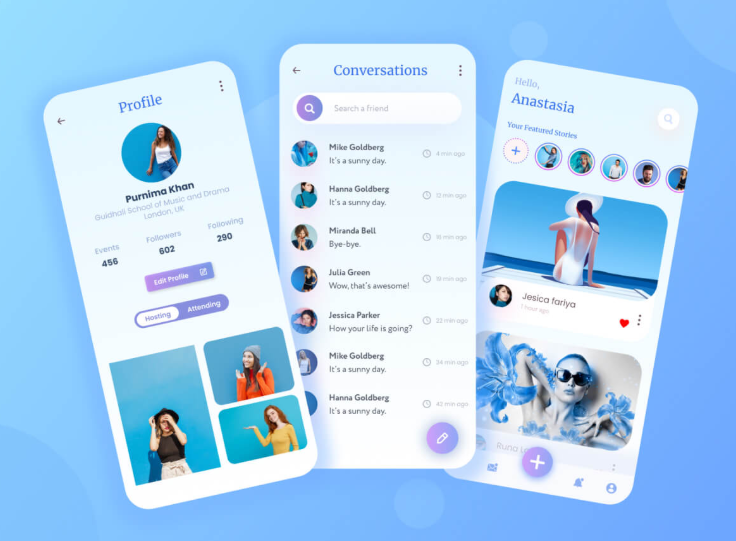

Download Snapchat App Redesign UI Kit — Free Figma Resource
- Fully editable Figma UI Kit
- Includes home, chat, stories, profile & settings screens
- Reusable components: buttons, icons, nav bars, typography
- License: Free for Personal & Educational Use
- Ideal for portfolio projects, case studies, or prototypes
Note: This Figma UI Kit is provided for personal and educational use only. Not for commercial resale or distribution.
The Snapchat experience has always been defined by its bold colors, playful interactions, and fast-paced storytelling. But as UI/UX trends continue to evolve, designers are constantly looking for modern, fresh, and minimal interpretations of popular social platforms. If you’re working on a social media concept, redesign challenge, or case study, a well-structured UI kit can save hours of work.
That’s where the Snapchat App Redesign UI Kit comes in—a beautifully crafted free Figma resource tailored specifically for designers who want to explore new interface possibilities for Snapchat.
What Is the Snapchat App Redesign UI Kit?
This UI kit is a complete set of screens, components, and design assets created to reimagine how Snapchat could look with a more refined, modern, and intuitive interface. Designed with Figma’s latest features, the kit incorporates:
- Clean typography
- Updated navigation styles
- Modern card layouts
- Soft shadows and minimalist icons
- Streamlined user flows
It’s perfect for UI/UX designers, students, and creative professionals who want to build:
- Snapchat redesign case studies
- Social media app concepts
- Portfolio projects
- Prototypes for mobile UI
- Design system explorations
What’s Included in the UI Kit?
The free Figma resource typically contains:
✔ Redesigned Snapchat Home Screen
A modern take on the camera and navigation layout with enhanced usability.
✔ Chat Screen & Messaging UI
Minimal message bubbles, improved spacing, and refined interactions.
✔ Stories & Spotlight Layouts
Card-based UI with smooth visual hierarchy and updated interaction cues.
✔ Profile & Settings Screens
Streamlined, airy, and easy to navigate, improving overall user control.
✔ Components & Design Elements
- Icon set
- Buttons & CTAs
- Navigation bars
- Color palette
- Typography presets
These elements make it effortless to create new screens or modify existing ones.
Why Designers Love It
1. Modern Approach to a Popular App
Redesign exercises are a great way to challenge design thinking. Putting a new spin on Snapchat’s iconic UI helps designers practice creativity while maintaining brand identity.
2. Saves Time in UI/UX Projects
Instead of building every component from scratch, you can focus on flow, usability, and storytelling.
3. Fully Editable in Figma
All layers are organized and grouped, making customization quick and intuitive.
4. Great for Portfolios
Clients and recruiters love seeing redesign projects. This kit gives you a head start to create polished case studies.
Who Should Use This UI Kit
This free Snapchat redesign UI kit is ideal for:
- UI/UX designers
- Mobile app designers
- Students working on design assignments
- Product designers exploring social app flows
- Freelancers building portfolio pieces
Whether you’re new to design or a seasoned professional, this resource can elevate your creative workflow.
How to Use the Figma Resource
- Open the Figma file link
- Duplicate the design to your workspace
- Explore the components and design system
- Customize layouts, colors, and interactions
- Use it in prototypes, presentations, or portfolio projects
It’s lightweight, clean, and fully editable—so you can adapt it to your preferred design style.
Final Thoughts
The Snapchat App Redesign UI Kit – Free Figma Resource is a must-have for anyone working on modern mobile UI concepts. It saves time, sparks inspiration, and helps designers rethink familiar interfaces with fresh perspective. Whether you’re experimenting with UI styles or building a detailed case study, this free resource is a powerful addition to your toolkit.